

Description
Most WooCommerce stores make customers juggle two address lists — one for billing, one for shipping — and re-type the same details every time they order. Unwan replaces both with one simple address book. Every saved address shows up everywhere, at checkout and in My Account, with no duplicates and no mix-ups.
It’s completely free, with everything included. No “Pro” version, no locked features, no upsells.
Curious how it’s built? The full code is open on GitHub, where you can also report a bug or request a feature.
One address book, not two
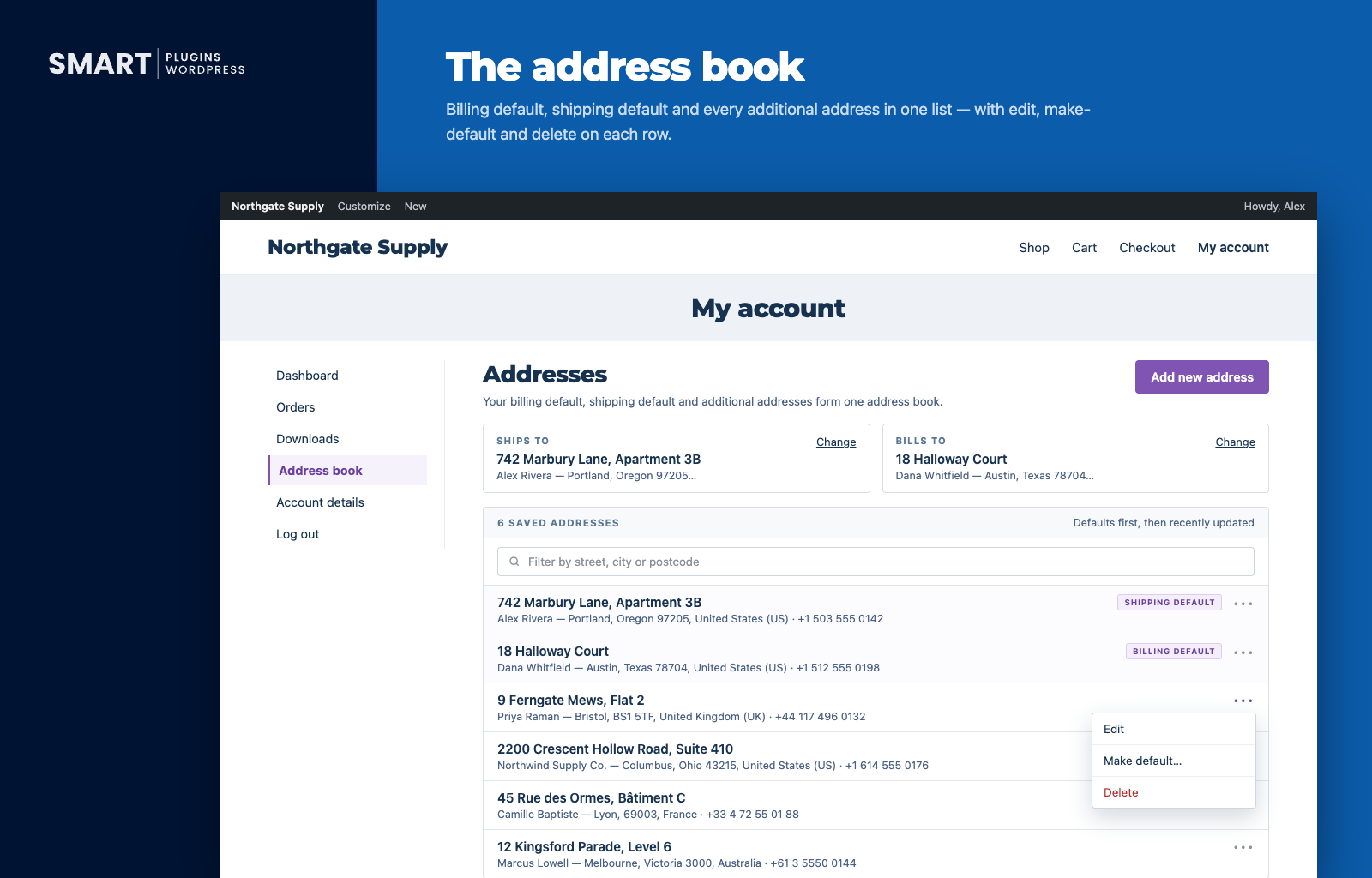
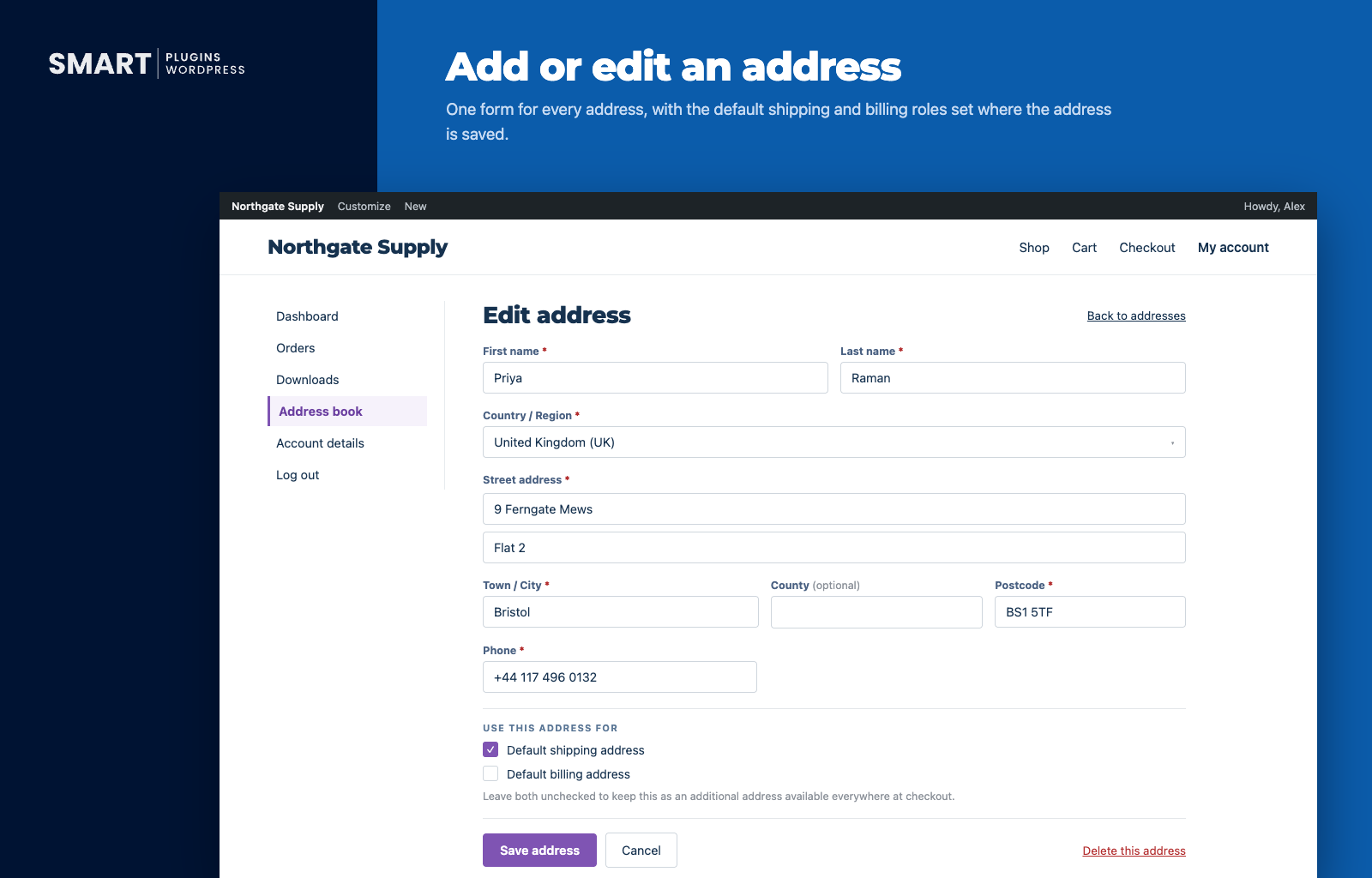
Instead of separate billing and shipping lists, Unwan keeps one shared list per customer. Any address can be the billing default, the shipping default, both, or neither. If a customer changes their default, the old address doesn’t disappear — it just goes back into their address book. Duplicate addresses are spotted automatically and merged, so nothing gets saved three times by accident.
Works with any checkout
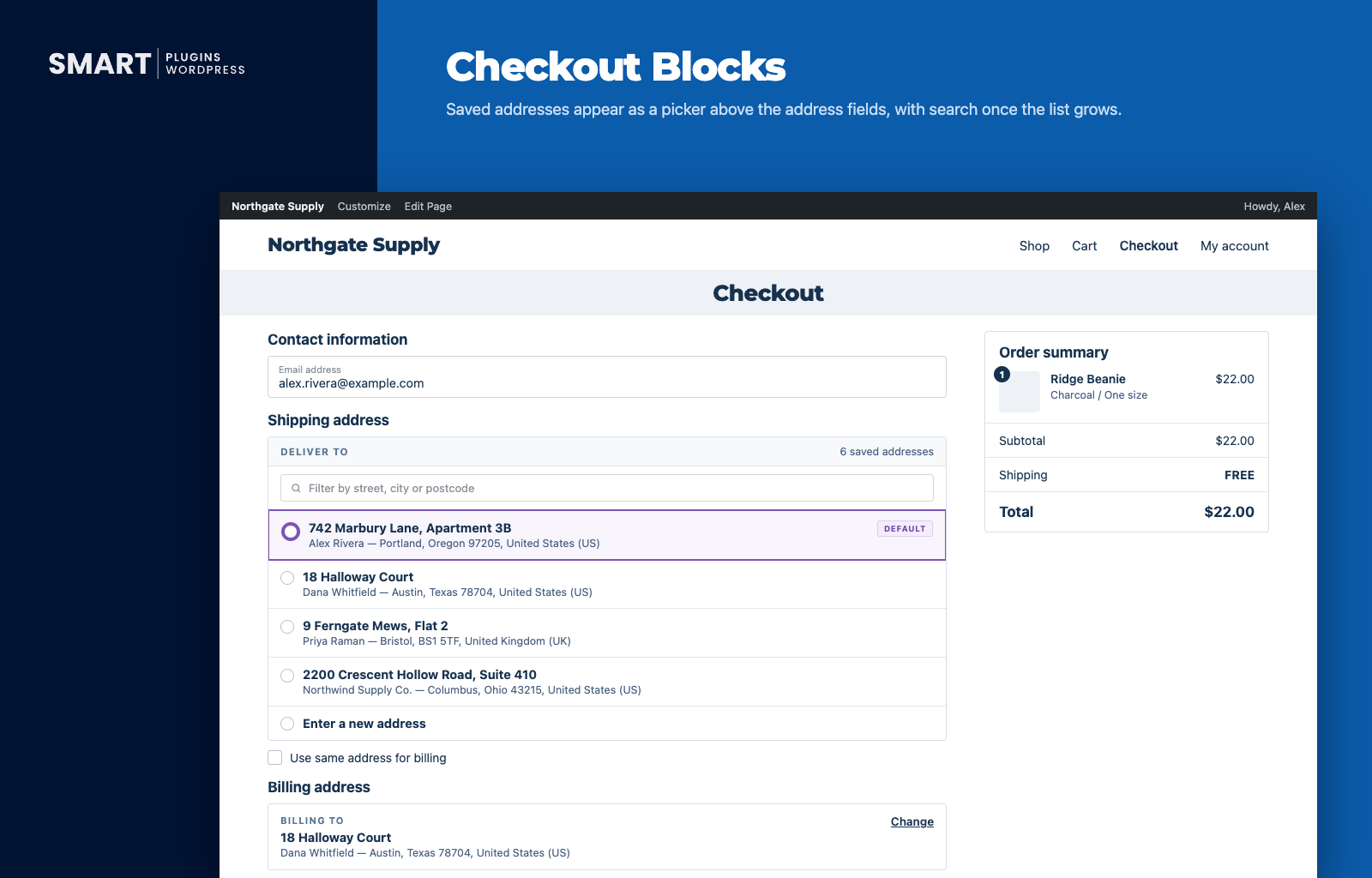
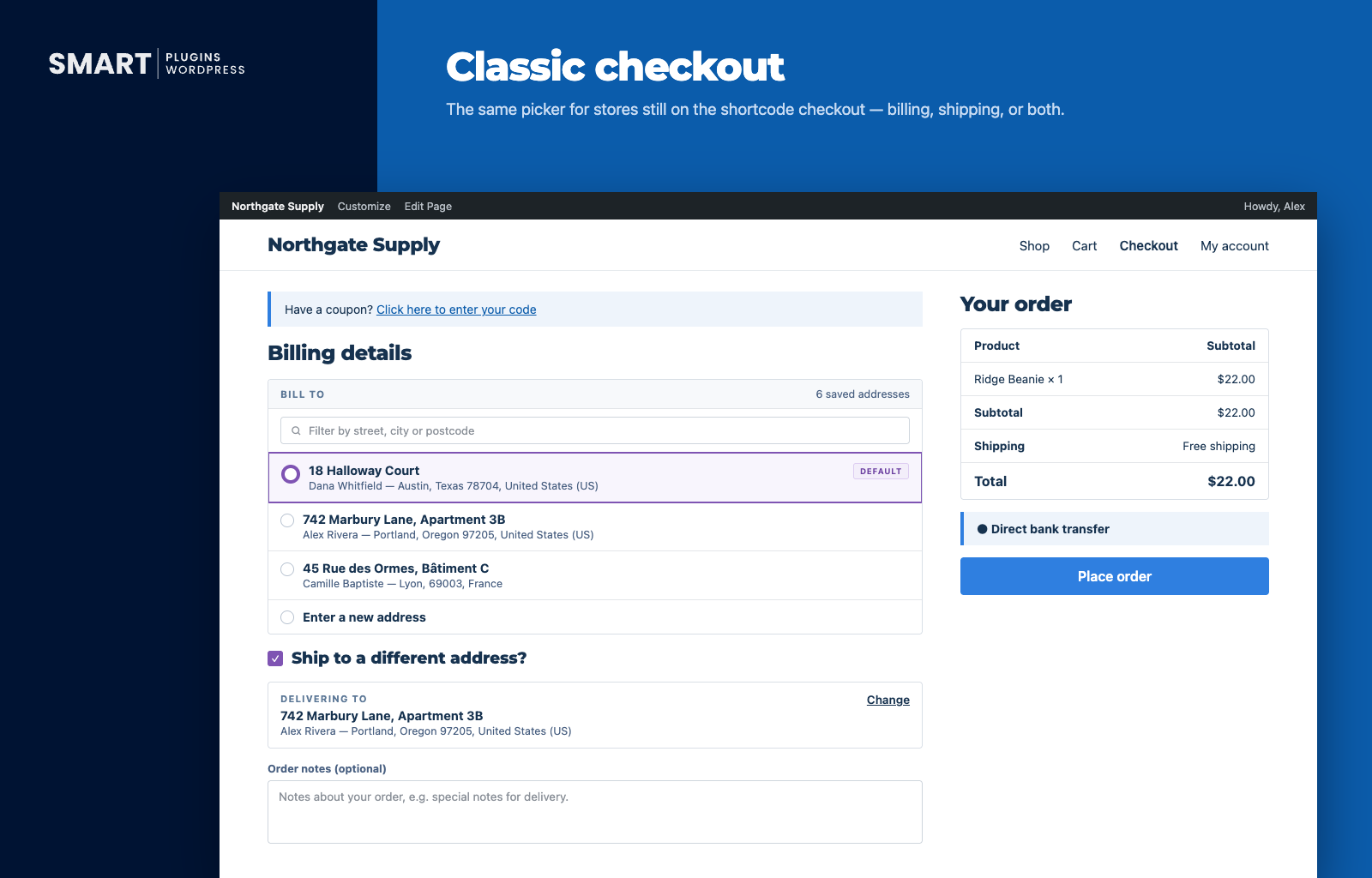
Unwan works naturally with WooCommerce’s newer block-based checkout — not as a bolted-on workaround. If your store still uses the classic checkout, customers get the exact same picker and experience either way.
Simple to use, on either end
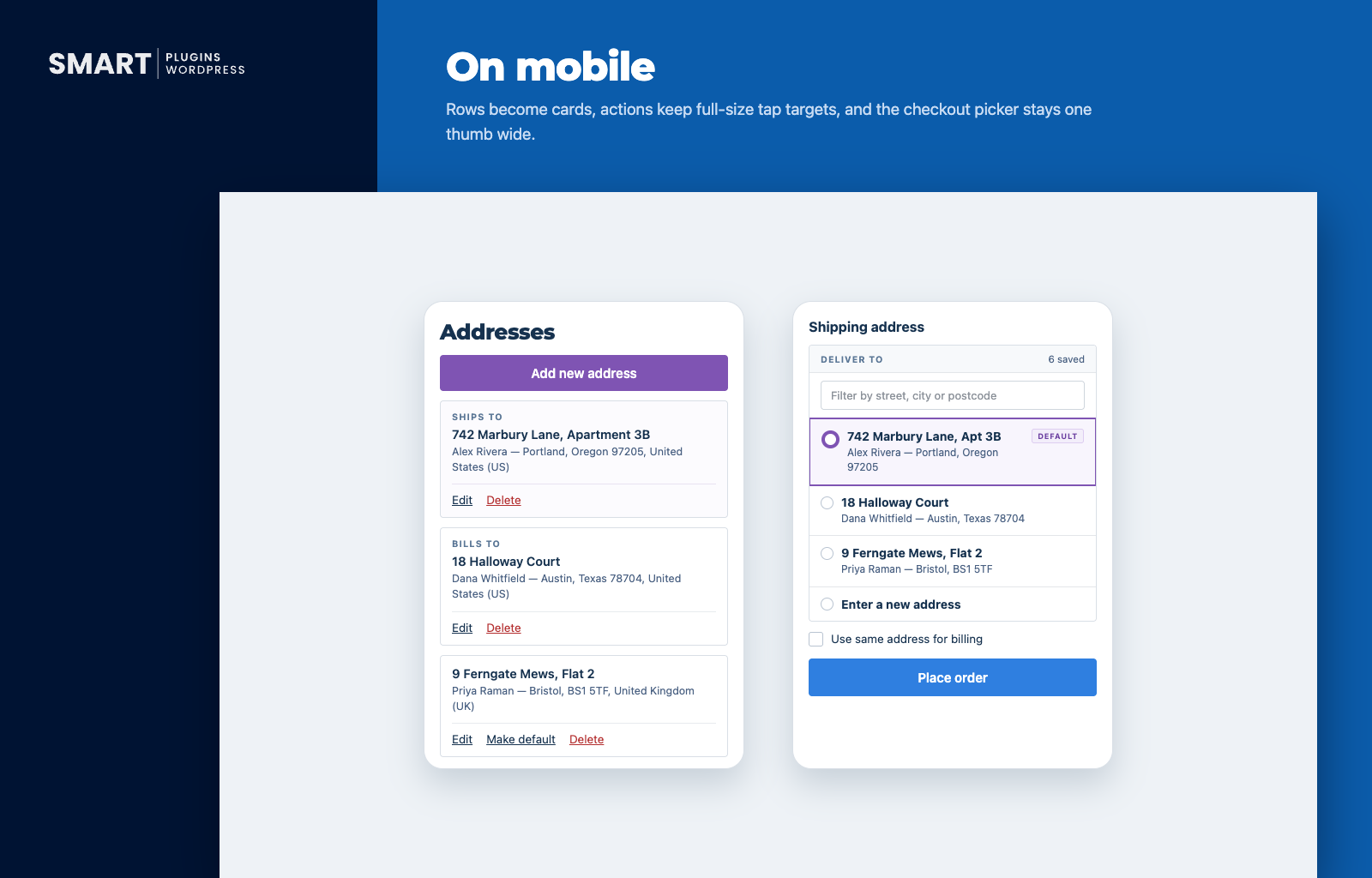
- Returning customers see their address at a glance, with a one-tap “Change” option.
- A search box appears automatically once someone has a few addresses saved.
- Full keyboard support for anyone who prefers not to use a mouse.
- Easy edit, delete, and “make default” options in My Account.
- Clean, simple design — no clunky dropdowns or layout jumps.
Matches your brand
Choose light, dark, or “match the customer’s device,” plus your own accent color. Every button and highlight throughout the picker and My Account updates to match — no design skills needed.
Won’t slow your site down
This was a priority from day one. Unwan has a negligible impact on site speed and loading times — it doesn’t add any new database tables, it only loads on the checkout and My Account pages, and it never phones home or tracks anything. It’s also carefully built to play nicely with your other plugins and themes.
Everything is customizable
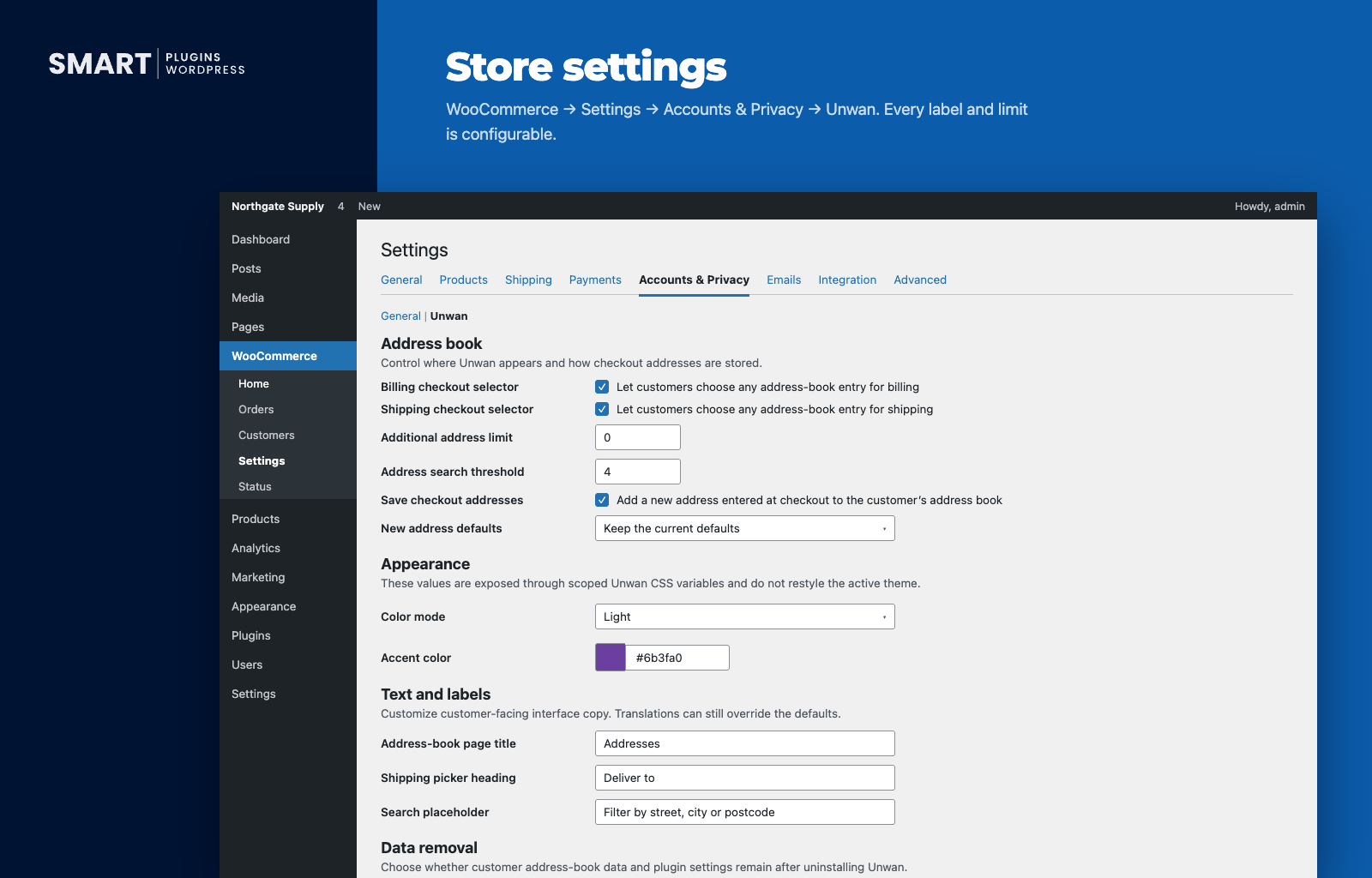
From WooCommerce > Settings > Accounts & Privacy > Unwan, you can control:
- Whether the address picker appears for billing, shipping, or both.
- How many addresses a customer can save.
- When the search box appears.
- Whether checkout addresses save automatically, and whether they become the new default.
- Colors and light/dark/system theme.
- Every bit of text customers see.
- Whether to remove all data if you ever uninstall the plugin.
Nothing needs to be touched to get started — the defaults work fine on their own.
Unwan is developed and maintained by SmartWP Plugins.
More from SmartWP Plugins
WP CodeKit — WordPress code generators (CSS, PHP, hooks, and more) with live previews, so you know what you’re getting before you copy it.
CSS LabKit — Visual tools for building shadows, gradients, and animations. See it, tune it, copy the CSS.
GrowQuest — Custom WordPress and WooCommerce development, for stores that have outgrown off-the-shelf plugins.
Screenshots
Installation
You’ll need: WordPress 6.5+, PHP 7.4+, and WooCommerce 8.2+ already installed and active.
From your WordPress dashboard
- Go to Plugins > Add New Plugin and search for “Unwan.”
- Click Install Now, then Activate.
- That’s it — Unwan works right away. To tweak anything, visit WooCommerce > Settings > Accounts & Privacy > Unwan.
Manual upload
- Download
unwan-for-woocommerce.zip. - In your dashboard, go to Plugins > Add New Plugin > Upload Plugin and select the file (or upload the unzipped folder via FTP/SFTP).
- Find “Unwan – Multiple Address Book for WooCommerce” in your plugins list and click Activate.
Using it
Once active, signed-in customers can manage their addresses under My Account > Address book — adding, editing, deleting, or setting a default. At checkout, anyone with a saved address sees a simple picker above the billing and shipping fields, letting them choose a saved address or enter a new one. It stays out of the way for guests and for customers who haven’t saved anything yet.
FAQ
-
Where’s the full documentation?
-
At docs.smartwpplugins.com/unwan — setup, settings, and more.
-
Is it really free?
-
Yes, completely. Unlimited addresses, checkout support, themes, colors, custom text — all included. There’s no paid upgrade.
-
Does it work with the new WooCommerce checkout?
-
Yes. It works natively with the block-based checkout, not as a workaround bolted on top.
-
Will this slow down my store?
-
No. Unwan has a negligible impact on site speed and loading times — it adds no new database tables, only loads on the pages where it’s actually needed, and makes no outside calls or tracking requests.
-
If a customer picks a saved address, does that replace their default?
-
Not unless you turn that on. By default, picking a saved address just uses it for that order — it won’t quietly overwrite the customer’s saved default.
-
Are new checkout addresses saved automatically?
-
Yes, by default (you can turn this off). If someone re-enters an address that’s already saved (same name, street and postcode), Unwan reuses it instead of creating a duplicate.
-
What happens to the old default address?
-
It’s not deleted — it just stays in the address book as a regular saved address, unless it’s still the default for the other one (shipping or billing).
-
Can I match it to my brand’s colors?
-
Yes — light, dark, or automatic (matches the customer’s device), plus any accent color you like. No design or CSS skills needed.
-
Does Unwan save custom checkout fields?
-
Unwan is designed to manage the standard WooCommerce address: name, company, address lines, city, state, postcode, country, and phone. That is what it saves, shows, and lets customers edit in My Account.
Unwan keeps one shared address book, where any address can be used for billing, shipping, or both. Fields that checkout field editors add to the billing or shipping address are built around one of those roles, so they stay with your field editor rather than in the address book.
At checkout, those fields appear as usual, handled by WooCommerce and your field editor. Unwan never hides or changes them. The same goes for any other checkout field, such as email, order notes, or additional information fields.
-
What happens to my data if I delete the plugin?
-
It’s kept by default. If you’d rather everything be removed, there’s a setting for that under WooCommerce > Settings > Accounts & Privacy > Unwan. Either way, your customers’ regular WooCommerce billing and shipping details are never touched.
Reviews

Contributors & Developers
“Unwan – Multiple Address Book for WooCommerce” is open source software. The following people have contributed to this plugin.
Contributors

Translate “Unwan – Multiple Address Book for WooCommerce” into your language.
Interested in development?
Browse the code, check out the SVN repository, or subscribe to the development log by RSS.
Changelog
1.0.8
- The postcode is now part of duplicate detection. An address that corrects only the postcode is saved as its own entry instead of being folded into the old one, and addresses that differ only in postcode both appear in the address book. Spaces and capitals in postcodes are still ignored.
1.0.7
- Interface text now follows each customer’s language. Labels left at their defaults were saved in the language of whoever saved the settings; those saved copies are removed on update, and customized labels can be translated with WPML or Polylang.
- Fixed checkout not pre-selecting a saved address for customers whose checkout only had the store’s default country filled in.
- Fixed classic checkout hiding a field the order was then refused for, such as an invalid postcode.
- Fixed classic checkout hiding a field required in the saved address’s country when that country differs from the store’s.
- Fixed classic checkout saving an empty address when a field editor removed the street, city and postcode fields.
- Fixed editing an address that is both the billing and shipping default overwriting details where the two differ, such as the apartment. Each default card now shows its own details.
- Fixed the My Account address search missing addresses written in accented or non-Latin letters, such as Łódź or Москва.
- Fixed the Address book page showing “Page not found” on multisite sites after network activation or an update.
- Fixed “That saved address could not be found” appearing on the next page instead of the one it was about.
- The address actions menu in My Account now closes when keyboard focus leaves it.
- Uninstall cleanup on multisite now keeps customers’ address books unless every site using Unwan asked for its data to be removed.
1.0.6
- Fixed checkout getting stuck when the store requires a field, such as phone or company, that a saved address doesn’t have. The field now appears so the customer can fill it in.
- Fixed every address field reappearing after a failed payment while a saved address was still selected.
- Fixed fields added by checkout field editors disappearing at checkout when a saved address was selected.
- Fixed classic checkout refusing orders with “Please choose a valid saved address” on checkout pages built with page builders, alongside another address-book plugin, and for customers with no saved addresses.
- Fixed orders for virtual or downloadable products replacing the customer’s default shipping address.
- Fixed the chosen billing address switching back on checkouts that need no shipping or that ship to the billing address.
- Fixed the order using a different address from the one shown after switching between delivery and local pickup.
- Fixed “Use same address for billing” billing the previous address after a saved delivery address was chosen.
- Fixed shipping rates and taxes being worked out for the default address after another saved address was chosen.
- Fixed “Make the new address the matching default” losing the previous default at block checkout, and doing nothing once the address limit was reached.
- Fixed saving an address in My Account wiping fields the form doesn’t show, such as a company or apartment hidden by a field editor.
- Fixed removing every default role from an address deleting it when the address limit was full.
- Fixed classic checkout not saving a changed billing email, or custom fields from checkout field editors, to the customer’s account.
- Fixed turning off one checkout selector stopping WooCommerce from updating that address.
- Fixed choosing “Enter a new address” a second time clearing what had been typed.
- Fixed classic checkout showing a mix of two addresses after the page was reloaded.
- The chosen address is now kept when the checkout page is reloaded or revisited.
- An address that isn’t in the address book now shows as “Enter a new address” with its fields open, instead of a closed summary above open fields.
- Saved addresses are now included in WordPress’s personal data export and erasure tools.
- The My Account address form now shows only the fields Unwan saves.
1.0.5
- Fixed the checkout address form collapsing after every field change when a multi-step checkout extension re-rendered the checkout. Addresses being typed in stayed open only until the next update.
- Fixed the billing address being overwritten by the shipping address when local pickup was selected, which also collapsed the billing form on every keystroke.
- Fixed an address entered at checkout not being saved to the address book after a checkout re-render, even though a new address had been chosen.
- Address fields now stay visible and editable for an address that is not in the address book, instead of having to be cleared and retyped.
1.0.4
- Verified compatibility with WordPress 7.1.
- Added an automated test suite covering address storage, default roles, checkout, and uninstall behaviour. It is development tooling and is not part of the plugin download.
1.0.3
- Added translations for ten languages: Spanish, French, German, Italian, Portuguese (Brazil), Dutch, Polish, Russian, Swedish, and Japanese.
- Fixed the saved-address counts (“2 saved addresses”) staying in English at checkout and in My Account.
- Fixed the “make default” menu actions mixing English into translated text.
- Tightened how the address book form checks the request method.
- Verified compatibility with WordPress 7.0 and WooCommerce 11.0.1.
1.0.2
- Verified compatibility with WordPress 7.0.2 and WooCommerce 11.0.1.
1.0.1
- Renamed the plugin to Unwan – Multiple Address Book for WooCommerce (slug unchanged).
1.0.0
- First release: address book in My Account, plus support for both classic and block-based checkout.
- Added a clean, simple, and accessible address picker.
- Checkout addresses save automatically, with duplicate protection and a customizable limit.
- Switching a default address never deletes the old one.
- Added a settings page for colors, text, and behavior.
- Added an optional full data cleanup when uninstalling.
- General performance improvements.