

Description
MountDev AI MCP Connector is a WordPress MCP plugin that lets you connect ChatGPT, Claude, and other MCP-compatible AI clients directly to your WordPress site. Use it to give AI agents secure, controlled access to WordPress posts, pages, media, comments, users, and other site resources through the Model Context Protocol.
If you are searching for a way to connect ChatGPT to WordPress, connect Claude to WordPress, or run AI agents on WordPress with secure authentication and permission controls, this plugin provides a practical WordPress AI connector for content management, publishing workflows, media handling, and site updates.
Built for agencies, developers, publishers, and teams using AI to manage WordPress, MountDev AI MCP Connector supports OAuth 2.0 for ChatGPT, WordPress Application Passwords for Claude Desktop, Cursor, and Windsurf, and profile-based access controls to help keep WordPress automation secure.
WooCommerce Support: Manage your online store with 74 WooCommerce-specific tools for products, orders, coupons, shipping, tax rates, webhooks, payment gateways, and reports. Control inventory, process refunds, manage product variations, and automate store operations through AI agents.
Features
- MCP Server Implementation – Full JSON-RPC 2.0 endpoint for MCP protocol
- OAuth 2.0 Support – Native OAuth authentication for ChatGPT with secure credential generation
- WordPress Application Passwords – Secure Basic Auth for Claude Desktop, Cursor, Windsurf
- Profile-Based Access Control – Predefined profiles for flexible tool management
- 149 Essential Tools – 75 WordPress core + 74 WooCommerce tools
- 74 WooCommerce Tools – Products, orders, coupons, shipping, tax, and more (requires WooCommerce plugin)
- Zero External Dependencies – Pure WordPress implementation
- AES-256-CBC Encryption – Client secrets stored securely
Supported Clients
- ChatGPT – OAuth 2.0 authentication with Client ID/Secret
- Claude Desktop – Basic Auth with Application Passwords
- Cursor – Basic Auth with Application Passwords
- Windsurf – Basic Auth with Application Passwords
- Any MCP-compatible client supporting OAuth 2.0 or Basic Auth
Supported Plugins
WordPress Core (75 tools) – Complete WordPress management including posts, pages, media, comments, users, taxonomies, site settings, menus, plugins, and themes.
WooCommerce (74 tools) – Full integration with WooCommerce for managing your online store:
* Products & Inventory – Create, update, manage variations, stock levels, categories, tags, brands, and attributes
* Orders & Fulfillment – Process orders, refunds, order notes, and customer management
* Store Operations – Coupons, shipping zones, tax rates, payment gateways, webhooks, and sales reports
All tools respect WordPress user capabilities and permissions. Visit the plugin’s Profiles tab to see the complete tool list and create custom access profiles.
External Services
This plugin includes a Node.js bridge script that connects MCP clients (Claude Desktop, Cursor, Windsurf, etc.) to your WordPress site’s REST API endpoints. The bridge facilitates communication between the MCP client and your WordPress installation.
What the service is and what it is used for:
The wordpress-mcp-bridge is a Node.js script that acts as a communication bridge between MCP-compatible AI clients and your WordPress site’s REST API. It translates MCP protocol requests into WordPress REST API calls and returns the responses to the AI client.
What data is sent and when:
When you use an MCP client (like Claude Desktop) with this plugin, the bridge sends the following data to your WordPress site’s REST API endpoints:
* Your WordPress username and Application Password (for authentication)
* MCP protocol requests (tool calls, resource requests, prompts)
* Content data when creating or updating WordPress posts, pages, media, etc.
* This data is sent every time you interact with WordPress through the MCP client
Where the data is sent:
All data is sent to YOUR OWN WordPress site’s REST API endpoints at:
* https://yoursite.com/wp-json/mountdev-ai-mcp-connector/v1/messages (main MCP endpoint)
* https://yoursite.com/wp-json/mountdev-ai-mcp-connector/v1/oauth/* (OAuth endpoints for ChatGPT)
Important notes:
* No data is sent to any third-party external services
* All communication is between the MCP client and your own WordPress installation
* Your WordPress credentials and data remain on your own server
* The plugin does not transmit any data to external services operated by the plugin author or any third parties
Security
- OAuth 2.0 with PKCE – Enhanced authorization flow for ChatGPT
- AES-256-CBC Encryption – Client secrets encrypted at rest
- Token Expiration – Access tokens expire after 1 hour
- Refresh Tokens – Valid for 30 days with automatic renewal
- Authorization Codes – Expire after 10 minutes
- WordPress Application Passwords – Secure Basic Auth for other clients
- Admin-Only OAuth – Only administrators can authorize ChatGPT connections
- Profile-Based Restrictions – Control which tools are available
- Capability Checks – All operations respect WordPress user permissions
- No Privilege Escalation – Users cannot perform actions beyond their role
License
This plugin is licensed under the GPL v3 or later.
See https://www.gnu.org/licenses/gpl-3.0.en.html for details.
Screenshots
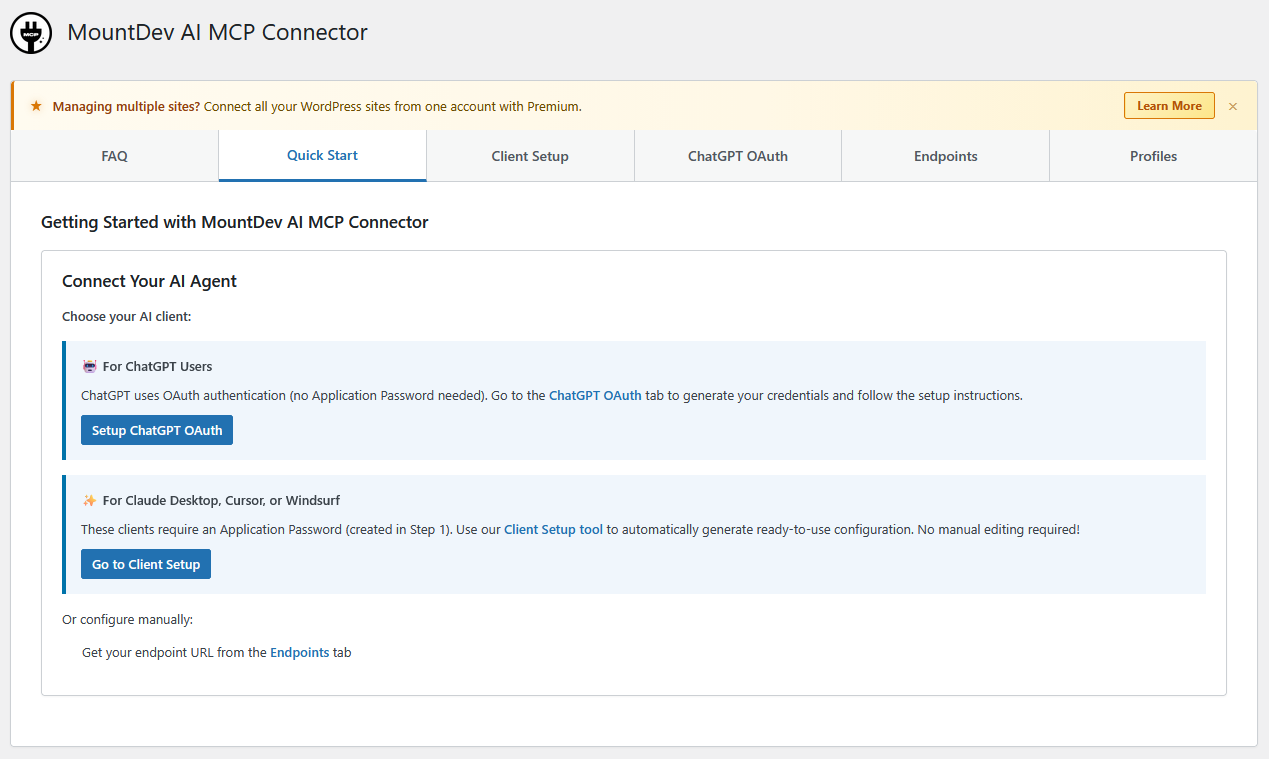
Quick start 
OAuth setup 
Profiles tab 
Endpoints tab 
Client setup tab 
FAQ tab
Installation
- Upload the
mountdev-ai-mcp-connectorfolder to/wp-content/plugins/ - Activate the plugin through the ‘Plugins’ menu in WordPress
- Go to Settings MCP Connector Quick Start to configure
For ChatGPT Users
- Navigate to MountDev AI MCP Connector ChatGPT OAuth tab
- Click Generate OAuth Credentials
- Copy the Client ID and Client Secret (keep them secure!)
- In ChatGPT, go to Settings Apps Create App
- Enter your MCP Server URL:
https://yoursite.com/wp-json/mountdev-ai-mcp-connector/v1/messages - Select OAuth authentication
- Paste your Client ID and Client Secret
- Authorize access when redirected to WordPress
For Claude Desktop / Cursor / Windsurf Users
- Create an Application Password in Users Profile
- Go to Settings MCP Connector Profiles and select a profile
- Use the Client Setup tab to automatically generate your configuration
- Or manually use endpoint:
https://yoursite.com/wp-json/mountdev-ai-mcp-connector/v1/messages - Authenticate with your WordPress username and Application Password
For WooCommerce Users
- Install and activate WooCommerce plugin
- Go to Settings MCP Connector Profiles
- Select a WooCommerce profile (
woo_read_only,woo_store_manager, orwoo_full_access) - WooCommerce tools will appear in your MCP client’s tool list
- Use
complete_siteprofile for all WordPress + WooCommerce tools
FAQ
-
What is MCP?
-
Model Context Protocol (MCP) is an open protocol developed by Anthropic that standardizes how AI assistants connect to external data sources and tools.
-
Is OAuth 2.0 secure?
-
Yes, we implement OAuth 2.0 with PKCE (Proof Key for Code Exchange) for enhanced security. All tokens have expiration times and refresh token rotation.
-
Do I need an API key?
-
For ChatGPT, generate OAuth credentials in the plugin admin. For other clients, use WordPress Application Passwords.
-
How do I set up ChatGPT?
-
Generate OAuth credentials in MountDev AI MCP Connector ChatGPT OAuth tab, then add the MCP server in ChatGPT settings with your Client ID and Secret. See Installation section for detailed steps.
-
Are my OAuth credentials secure?
-
Yes. Client secrets are encrypted using AES-256-CBC encryption before storage. Only WordPress administrators can generate or view credentials.
-
Do I need WooCommerce installed to use this plugin?
-
No. The plugin works independently for WordPress content management. WooCommerce tools only appear when WooCommerce is installed and active.
-
What WooCommerce features are supported?
-
74 tools covering products, variations, categories, tags, brands (with WooCommerce Brands extension), attributes, orders, refunds, order notes, coupons, shipping zones, tax rates, webhooks, payment gateways, sales reports, and system status.
-
How do I enable WooCommerce tools?
-
Install WooCommerce, then select a WooCommerce profile in Settings MCP Connector Profiles. Tools automatically appear when WooCommerce is active.
-
Can I use WooCommerce tools with ChatGPT and Claude?
-
Yes. WooCommerce tools work with all supported MCP clients (ChatGPT, Claude Desktop, Cursor, Windsurf) using the same OAuth or Application Password authentication.
Reviews
There are no reviews for this plugin.
Contributors & Developers
“MountDev AI MCP Connector” is open source software. The following people have contributed to this plugin.
Contributors
Translate “MountDev AI MCP Connector” into your language.
Interested in development?
Browse the code, check out the SVN repository, or subscribe to the development log by RSS.
Changelog
1.1.1
- Changed: Updated readme description for better clarity
- Fixed: WooCommerce default profiles now properly hidden when WooCommerce plugin is deactivated
- Fixed: Removed WooCommerce badge from FAQ section when WooCommerce is not active
1.1.0
- Added: 74 WooCommerce tools across 3 new tool classes
- Added: 4 new predefined profiles (woo_read_only, woo_store_manager, woo_full_access, complete_site)
- Added: WooCommerce Brands extension support with 5 brand management tools
- Added: Global product attributes management with 8 attribute tools
- Added: Enhanced Profile Manager UI with WooCommerce branding and search/filter
- Added: Advanced product features (Global Unique ID, sold individually, shipping dimensions, linked products)
- Added: Comprehensive coupon management with usage restrictions and limits
- Changed: Profile Manager UI now separates WordPress and WooCommerce tools
- Changed: Tool categories expanded from 10 to 28 categories
- Changed: Tool count increased from 75 to 149 total tools
- Technical: Conditional WooCommerce tool registration (only when WooCommerce is active)
- Technical: 3 new tool classes (Woo_Product_Tools, Woo_Order_Tools, Woo_Store_Tools)
1.0.0
- Initial release
- MCP Server Implementation with JSON-RPC 2.0 endpoint
- OAuth 2.0 support for ChatGPT
- WordPress Application Passwords for Claude Desktop, Cursor, Windsurf
- 75 WordPress core tools across 10 categories
- Profile-based access control with 3 predefined profiles